
RSE Sheffield Blog

Managing Research Code at Sheffield: Getting Started with GitHub Organisations

Joe Heffer
30 January 2026 12:00

This guide is for researchers at the University of Sheffield who need to set up a GitHub Organisation for their team or project. It covers the essential decisions you’ll need to make, explains who is responsible for what, and walks through key security settings.

Why use a GitHub Organisation?

If you’re already using Git and GitHub for version control (and if you’re not, there are good reasons to start), you’ve probably been working from your personal account. That works fine for solo projects, but research groups face a specific problem: what happens to the code when people leave?

When a PhD student or postdoc moves on, their personal repositories often become “gradware”—abandoned code that the group can no longer access or maintain. An Organisation solves this by giving the research group itself ownership of the code, separate from any individual’s account.

Organisations also let you:

  • Manage access centrally (who can see what, who can change what)
  • Set consistent security policies across all your projects
  • Keep your group’s *work together in one discoverable place

The University’s GitHub Enterprise Early Access Program provides access to these features. This provides several advantages over a standard free account, including:

  • Unlimited Private Repositories: Collaborate securely within your team without public exposure.
  • Enhanced Security: Access to advanced tools like secret scanning to prevent accidental leaks of API keys or credentials.

To get started, you will need to follow the University’s formal onboarding process. Please refer to the GitHub Enterprise Policy Document; specifically, you will find the required setup form in Section 5 (Requesting an Organisation).

💡 Tip: When naming your Organisation, choose something descriptive and evergreen such as UoS-[Institute] or UoS-[Lab-Name], rather than something tied to a specific year or project. An organisation can contain multiple repositories that span multiple projects.

Who looks after the Organisation?

GitHub Organisations need designated Owners—people who take responsibility for the space. This isn’t just a technical role; it comes with ongoing obligations.

You need at least two owners for continuity. These people will be responsible for:

  • User management: inviting new members, removing people who leave
  • Security oversight: ensuring the organisation follows University policies, responding to security alerts
  • Housekeeping: periodically reviewing inactive members, archiving old repositories

Choose your owners carefully. They should be people who’ll be around for a while and who understand (or are willing to learn) the security implications of managing shared code. The full list of owner responsibilities is in Section 1.3 of the GitHub Enterprise policy.

To prevent an Organisation from becoming “orphaned” when a researcher moves on, we recommend that the Principal Investigator (PI) or a permanent staff member always holds one of the Owner roles. This ensures the department retains access to the research outputs even after students or post-docs finish their contracts.

Essential security settings

Once your Organisation is created, you’ll need to configure some settings. You’ll find these under Settings in your organisation’s GitHub page. The GitHub documentation on security settings covers everything in detail, but here are the key ones to address first.

If you’re working with commercially sensitive code, personal data, or anything requiring particular protection, contact the Research & Innovation IT team to discuss your specific needs.

Restrict public repository creation

Where: Settings → Member privileges → Repository creation

What to do: Untick “Public” (leave Private and/or Internal enabled)

Why: This prevents anyone from accidentally making a repository public. Research code often needs to stay private until publication—or permanently. With this setting, making something public requires deliberate action by an owner.

Control outside collaborators

Where: Settings → Member privileges → Outside collaborators

What to do: Untick “Allow repository administrators to invite outside collaborators”

Why: Outside collaborators are people who aren’t organisation members but can access specific repositories. Without this control, any repository admin could invite external people without oversight. Centralising this with owners means you always know who has access and can ensure external users meet any contractual or ethical requirements.

Enable automated security scanning

Where: Settings → Code security and analysis

What to do: Enable “Dependabot alerts” and “Secret scanning”

Why: These tools watch for common security problems:

  • Dependabot alerts you when the libraries your code depends on (Python packages, R packages, etc.) have known security vulnerabilities. It can even suggest fixes automatically.
  • Secret scanning catches accidentally committed passwords, API keys, or other credentials. This happens more often than you’d think, and catching it early prevents data breaches.

Restrict GitHub Actions

Where: Settings → Actions → General → Policies

What to do: Select “Allow enterprise actions and reusable workflows”

Why: GitHub Actions runs automated tasks on your code (tests, checks, deployments). There’s a marketplace of community-built Actions, but not all are trustworthy. Restricting to enterprise-approved actions reduces the risk of malicious code running in your workflows.

Limit Personal Access Tokens

Where: Settings → Personal access tokens → Settings

What to do: Under “Tokens (classic)”, select “Restrict access via personal access tokens (classic)”

Why: Personal Access Tokens let scripts access GitHub on behalf of a user. Classic tokens have broad permissions and are a security risk if leaked. This setting forces users to approve which organisations their tokens can access and encourages use of the newer, more secure fine-grained tokens.

Require two-factor authentication

Where: Settings → Authentication security

What to do: Tick “Require two-factor authentication for everyone in your organization”

Why: Your organisation’s security is only as strong as its weakest password. Two-factor authentication means that even if someone’s password is stolen, attackers still can’t access your repositories.

Protecting important repositories

Beyond organisation-wide settings, your most important repositories deserve additional protection.

Branch protection rules

Where: Repository Settings → Branches → Add branch protection rule

What to do: Target your main branch and enable “Require a pull request before merging” and “Require approvals”. While you’re there, also turn on:

  • Dismiss stale pull request approvals when new commits are pushed
  • Require approval of the most recent reviewable push

Why: Without branch protection, anyone on the team—including you—can push changes directly to your main branch. Requiring a pull request means every change has to be reviewed before it lands: the code equivalent of asking a colleague to read over your work before you send it.

Why those two extra settings matter

There is a gap in the default pull request setup that is easy to overlook. Once a PR is approved, any team member can still push new commits to the same branch. The approval stays in place even though the code has changed, so those unreviewed commits can be merged straight through—quietly bypassing the review process.

"Dismiss stale approvals" clears existing sign-offs the moment new commits arrive, forcing another review. "Require approval of the most recent push" goes further: it ensures the reviewer explicitly signed off on exactly what gets merged, not an earlier version of it. Without both settings, the approval requirement is straightforward to circumvent, intentionally or not.

Common mistakes to avoid

Committing data to repositories. GitHub is for code, not data storage. Large files make repositories sluggish, and committing research data may violate ethics approvals. Use a .gitignore file to exclude data files and folders.

⚠️ Warning: GitHub is not a data repository. Never commit raw research data, sensitive participant information, or large binary datasets to GitHub. Use it for code, scripts, and documentation only.

Hard-coding credentials. It’s tempting to put database passwords or API keys directly in scripts. Don’t. Use environment variables or a .env file (added to your .gitignore) to keep credentials separate from code.

Going further

This guide covers the essentials, but GitHub offers more for making research software FAIR (Findable, Accessible, Interoperable, Reusable):

  • Citation files: Add academic citations using the Citation File Format so others can credit your work properly
  • Archiving with ORDA: Archive snapshots of your code in the University’s research data repository with a permanent DOI
  • Automated testing: Use GitHub Actions to run tests automatically when code changes

Why use ORDA instead of just leaving code on GitHub? While GitHub is excellent for active development, it does not guarantee long-term preservation. To meet most funder requirements, you should archive “frozen” versions of your code in ORDA.

Unlike GitHub, ORDA provides a persistent Digital Object Identifier (DOI). This ensures that when you cite your code in a paper, the link will never break, and other researchers can access the exact version of the software used to produce your results.

For more information on integrating GitHub with ORDA (which is based on the FigShare platform,) please read How to connect Figshare with your GitHub account on the FigShare documentation.

Summary checklist

If you are starting a new research organisation today, follow these six steps:

  1. Request Access: Complete the form in Section 5 of the Enterprise Policy.
  2. Assign Owners: Ensure at least two people (including a permanent staff member) have Owner status.
  3. Restrict Creation: Set “Repository Creation” to Owners Only to prevent sprawl.
  4. Enforce 2FA: Check that “Require two-factor authentication” is active for all members.
  5. Protect Branches: Enable “Branch Protection” for your main or master branches.

Getting help

Contact the Research Software Engineering or Research & Innovation IT team if you need help choosing the right settings, working with sensitive data, or troubleshooting permissions issues.

While the security configurations outlined above provide a robust baseline for most projects, it is important to remember that security is not a one-size-fits-all requirement. Not every option needs to be strictly locked down in all circumstances; rather, managing an organization involves making informed judgments and balancing security trade-offs against the specific collaborative needs of your research. If you are uncertain about which settings are appropriate for your project’s unique requirements, or if you need help navigating these decisions, you can contact us for further guidance

Training courses

We offer a range of short courses throughout the year that are free for all researchers. Learn beginner to advanced skills in popular programming languages, computing, and statistical packages.

As part of the FAIR² for research software curriculum, the Research Software Engineering team provides a two-tiered version control training program tailored specifically for researchers. The journey begins with the “Git, GitHub and GitKraken - From Zero to Hero” module, which introduces absolute beginners to version control basics and collaborative workflows using graphical tools. For those looking to level up, the “Git With It” session dives deeper into branch management, commit history, and advanced collaboration techniques. Together, these modules empower researchers to move beyond basic file saving, ensuring their code is reproducible, organized, and ready for collaborative open research.

Online guidance

These resources provided by other Universities may be useful as you learn to collaborate on research software using GitHub:


RSE Supported Projects

Neil Shephard
30 September 2025 13:00

Following the success of the 2024 call for proposals the RSE team in Sheffield put a call out a second call for proposals earlier this year. The call was open to all researchers across the university and successful applicants would receive dedicated support from an RSE Team member for upto 50% FTE for a period of six months.

Here we review the work undertaken on the projects we supported last year and introduce the successful applications in the 2025 round.


Sheffield RSE travelled to RSECon25

Romain Thomas
29 September 2025 13:00

A few weeks ago, the Research Software Engineering (RSE) community gathered at the University of Warwick for RSECon25 (9–11 September 2025). The conference brought together hundreds of RSEs, researchers, and collaborators to share their work on software, best practices, exchange ideas, and build the future of research software.
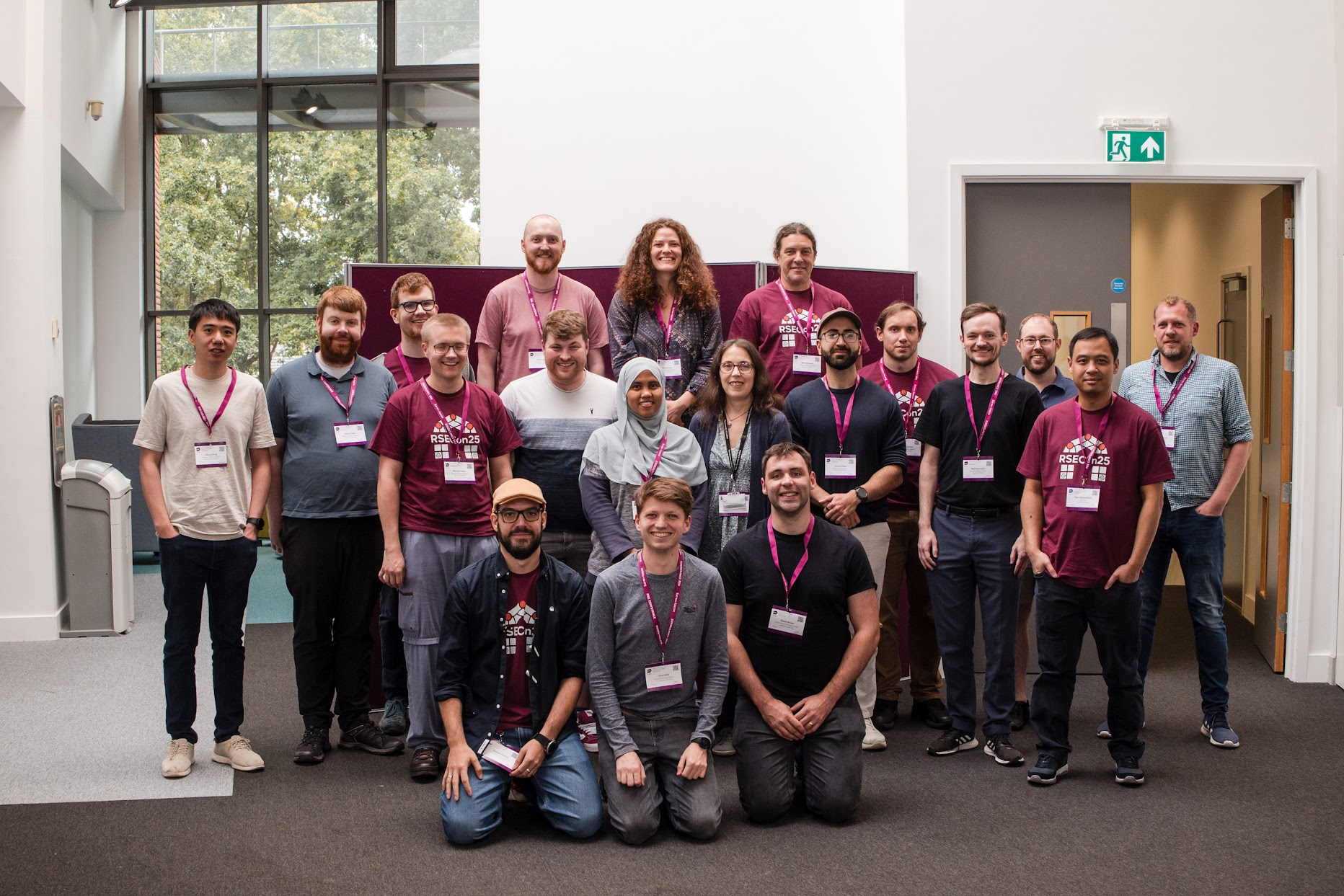
Sheffield representation at RSECon25
From left to right: Yuliang Weng, Martin Dyer, Daniel Brady, Michael Foster, Romain Thomas, Peter Heywood, Shaun Donnelly, Erika Siregar (PhD from the information School), Christopher Wild, Gemma Ives, Tamora James, Edwin Brown, Neil Shephard, Farhad Allian, Robert Chisholm,Matthew Leach, Joe Heffer, Twin Karmakharm, Paul Richmond

The University of Sheffield RSEs played a major role in this year’s event — not only as a Silver Sponsor, but also through leadership positions, presentations, posters, workshops, and volunteering. Our team’s involvement demonstrates Sheffield’s strong commitment to the RSE community.

Several Sheffield RSEs took on key leadership roles in shaping RSECon25:

  • Twin Karmakharm – Steering Committee Chair
  • Romain Thomas – Programme Co-chair
  • Robert Chisholm – Logistics Co-chair
  • Neil Shephard – Publicity Chair

These roles highlight the influence and responsibility our team have in driving the direction and success of the national RSE conference.

In addition, Sheffield’s RSE team was present across the programme, with contributions spanning talks, posters, walkthroughs, and workshops:

  • Talks & Walkthrough:
    • Matthew Leach – AMD GPUs for Scientific Computing
    • Shaun Donnelly & Edwin Brown – How to talk to your documents: An introduction to using natural language to query documents with Retrieval Augmented Generation (RAG)
    • Romain Thomas & Neil Shephard – Running a local RSE call for proposals
  • Workshops:
    • Robert Chisholm & Peter Heywood – Reasonable Performance Computing SIG (SIG-RPC): Help Identify and Document Performance Traps in Research Software
  • Posters:
    • Tamora James & Romain Thomas - FAIR2 for research software: developing a FAIR (Findable, Accessible, Interoperable and Reusable) and reproducible research software training programme
    • Edwin Brown - AutoEmulate:  Python library for automatically creating accurate and efficient emulators of complex simulations
    • Dan Brady - Leveraging GitHub API Data to Evaluate Git and GitHub Training Outcomes
    • Martin Dyer - Developing the GOTO Telescope Control System

This broad and diverse participation reflects the strength of our team across technical expertise, training, and community support.

Sheffield colleagues also supported the smooth running of the conference through volunteering (Daniel Brady & Michael Foster) and session chairing (Paul Richmond & Joe Heffer from the DAS team).

Looking towards RSECon26

We are excited to announce that the University of Sheffield will host RSECon26 in 2026 at the wave (9-11th September), which will also be co-located with the first International Research Software Conference (IRSC) (7-8th September). Building on our contributions at Warwick, we look forward to welcoming the RSE community to Sheffield next year for another vibrant and impactful conference. Romain Thomas and Twin Karmakharm will be leading the conference as programme chairs.

  • Credit Photo: RSE Society

RSE Supported Projects

Neil Shephard
24 September 2024 13:00

Earlier this year the RSE team in Sheffield put a call out for proposals for researchers in the University of Sheffield to collaborate with the RSE team. The successful applicants would receive dedicated support from an RSE Team member at 50% FTE for a period of six months.


Python Virtualenvwrapper

Neil Shephard
13 August 2024 13:00

This article introduces virtualenvwrapper for creating and working with Python Virtual Environments showing how to install and use it and highlighting some useful features.


Best Practices in AI Afternoon Event Summary

Twin Karmakharm and Christopher Wild
31 July 2024 10:00
Best Practices in AI Afternoon Banner

We’ve finally put all the videos, slides and other resources together from the Best Practices in AI Afternoon event that happened on the 5th of July 2024. You can find them listed below.


Upgrading R to at least version 4.4.0

Grace Accad, Gemma Ives, Will Furnass
19 July 2024 10:00

Upgrading R to at least version 4.4.0

Due to a security vulnerability, all users are advised to update their installation of R to version 4.4.0 or newer as soon as possible (ideally within the next month).


Bede Tier 2 HPC: Nvidia Grace-Hopper Superchip Pilot

Peter Heywood
8 May 2024 15:00

GH200 GPUs now available in N8 CIR Bede

Members of the University of Sheffield have access to a range of GPU resources for carrying out their research, available in local (Tier 3) and affiliated regional (Tier 2) HPC systems.

As of March 2024, the N8 CIR Bede Tier 2 HPC facility now includes an Open Pilot of 3 NVIDIA GH200 Nodes which are available to all users.

Each GH200 node in Bede contains a single NVIDIA GH200 Grace Hopper Superchip - a 72 core NVIDIA Grace ARM CPU connected to a single NVIDIA Hopper GPU via a 900GB/s NVIDIA NVLink-C2C interconnect. This new interconnect allows data to be moved between the host and device with a much higher bandwidth than in traditional PCI-e based systems, reducing the time spent transferring data.


Upcoming : Git & GitHub through GitKraken - Zero to Hero!

Neil Shephard
28 February 2024 12:00

The RSE Team are pleased to announce four scheduled sessions of the ever popular Git & GitHub through GitKraken - Zero to Hero!. These courses will run in-person over two consecutive days in morning sessions from 09:30 to 13:00 on the following days.

What are Git, GitHub and GitKraken?

Git is a system of version controlling your code. Think of it as a lab-book or doctors notes that are taken as you progress through your work, recording conditions, saving what has worked and correcting what doesn’t.

GitHub is a website that allows people to work collaboratively on version controlled code.

GitKraken is a client for working with Git and GitHub that includes both a GUI (Graphical User Interface) and a CLI (Command Line Interface)

Who is the course for?

Everyone who writes code! If you write scripts to analyse your code in R, Stata or Matlab you would benefit from using Git to version control your code and GitHub to share your code and make it open. If you write Python, JavaScript, C/++ code as part of a team in your research group you would benefit from using Git and GitHub to work together.

Getting started with these tools can be overwhelming but by taking this course you will be introduced to the concepts behind them and how to use them effectively to not just version control your own work but work with others on the same code.

The course material is available online if you want to take a peek and the first half using Git and publishing web-pages can be worked through in your own time. The real benefit comes from participating in the collaborative exercises in the second half where you work together on projects making Pull Requests and resolving problems that arise.

If you’ve never used Git, GitHub or GitKraken or have only just started then sign-up and come and learn more about these powerful tools.


Pytest Parametrisation

Neil Shephard
24 January 2024 12:00

Pytest is an excellent framework for writing tests in Python. One of the neat features it includes is the ability to parameterise your tests which means you can write one test and pass different sets of parameters into it to test the range of actions that the function/method are meant to handle.

Contact Us

For queries relating to collaborating with the RSE team on projects: rse@sheffield.ac.uk

Information and access to Bede.

Join our mailing list so as to be notified when we advertise talks and workshops by subscribing to this Google Group.

Queries regarding free research computing support/guidance should be raised via our Code clinic or directed to the University IT helpdesk.

List of archived pages: Archive.